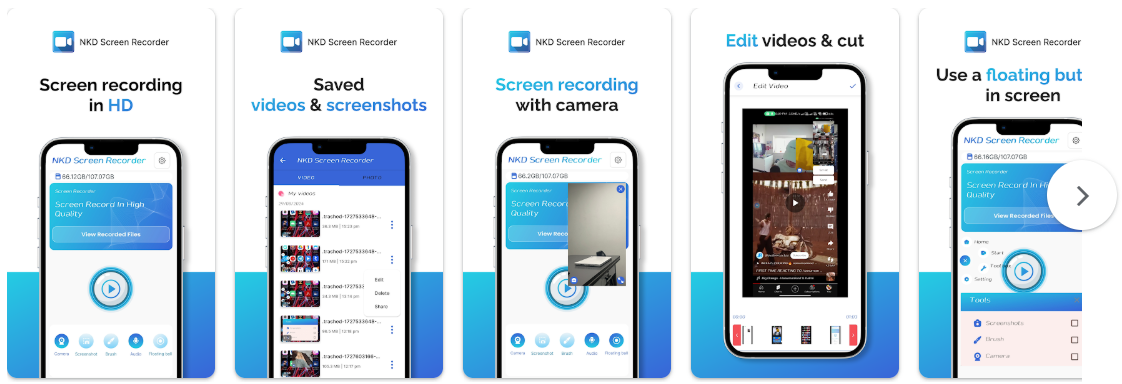
Saharanpur, Uttar Pradesh Aug 13, 2025 (Issuewire.com) - NKD Screen Recorder Video Recorder officially launches, bringing a comprehensive suite of features tailored for gamers, streamers, and content creators. The app allows users to capture crystal-clear screenshots and record smooth, lag-free gameplay with internal audio, free from background noise. With built-in YouTube and RTMP live streaming, brush tools for on-screen drawing, and a powerful video editor for trimming, adding music, and adjusting speed, NKD offers unmatched versatility. Supporting up to 120 FPS recording, Full HD export (240p–1080p, 60FPS, 12Mbps), and flexible storage options—all without watermarks or time limits—NKD Screen Recorder delivers a truly professional recording experience for everyone.
Core Features
● Capture screen to take a clear Screenshot
● Record Gameplay on your phone
● Internal audio recording without noise
● YouTube & RTMP Live stream: be a gaming streamer to gain fun and popularity
● Brush Tools: draw on the screen to make your screen capture extra special
● Video Editor: trim, remove the middle part, add music and speed control
● Maximum 120 FPS recording support to enjoy the ultimate visual experience
● Export Full HD video with custom settings: 240p to 1080p, 60FPS, 12Mbps
● Customize floating ball style & opacity: a tailor-made one only for you
● One-tap Trash control: Enable or Disable it as you like
● No watermark: record a clean video & screenshot
● No recording time limits & No root needed
● Floating window: One touch to snap the exact moment or hide it when it’s not needed
● Custom Floating Window: show recording time or minimize it & replace button function
● Alternative storage location: internal storage/ SD card
● Easy to pause/resume recording, rotate screen
Google Play Store:https://play.google.com/store/apps/details?id=com.nkd.screenrecorder&hl=en_IN
Official Website:https://multiappstudio.com/screenR/
Media Contact
NKD Devloper musicbazaar.feedback@gmail.com https://play.google.com/store/apps/details?id=com.nkd.screenrecorder&hl=en_IN




