Seattle, Washington Aug 9, 2024 (Issuewire.com) - DVDFab, a leading name in the multimedia software industry, is proud to announce the launch of two innovative products: DVDFab Blu-ray After Editor and DVDFab UHD After Editor. These innovative tools offer unparalleled do-it-yourself capabilities for Blu-ray and UHD discs, establishing a new benchmark in the industry.
Introducing DVDFab Blu-ray After Editor and UHD After Editor
Designed to cater to the growing demand for high-quality reauthoring tools, DVDFab Blu-ray After Editor and UHD After Editor provide a comprehensive suite of features that empower users to edit, enhance, and customize their Blu-ray and UHD discs with ease. The dedication of DVDFab to providing cutting-edge solutions for both professionals and multimedia enthusiasts is reflected in these new products.
DVDFab Blu-ray After Editor
- Comprehensive Audio Editing: Add, or replace audio tracks in Blu-ray discs, supporting multiple audio formats for a personalized experience.
- Subtitles Management: Delete or replace subtitles, including support for multiple languages and formats.
- High Compatibility: Seamlessly works with various Blu-ray formats, ensuring wide-ranging usability.
DVDFab UHD After Editor
- Superior Audio Editing: Enhance UHD Blu-rays by adding or replacing audio tracks, compatible with multiple audio formats.
- Advanced Subtitles Handling: Add and customize external SUP or ASS subtitles to 4K Blu-ray movies
- High-Fidelity Support: Maintains the original quality of UHD content, preserving high-definition details.
Why Choose (4K Ultra HD) Blu-ray After Editor?
The Blu-ray After Editor and UHD After Editor that DVDFab introduced are intended to make it easier to edit or remove audio and subtitles from ISO files of source discs. When it comes to efficiency and accuracy, these programs outperform Blu-ray Ripper and Blu-ray Copy. Users can easily enhance their Blu-ray and UHD content with multilingual audio and subtitles, making it an ideal choice for those seeking a quick and accurate way to customize their high-definition media.
How to DIY Blu-ray using DVDFab Blu-ray After Editor?
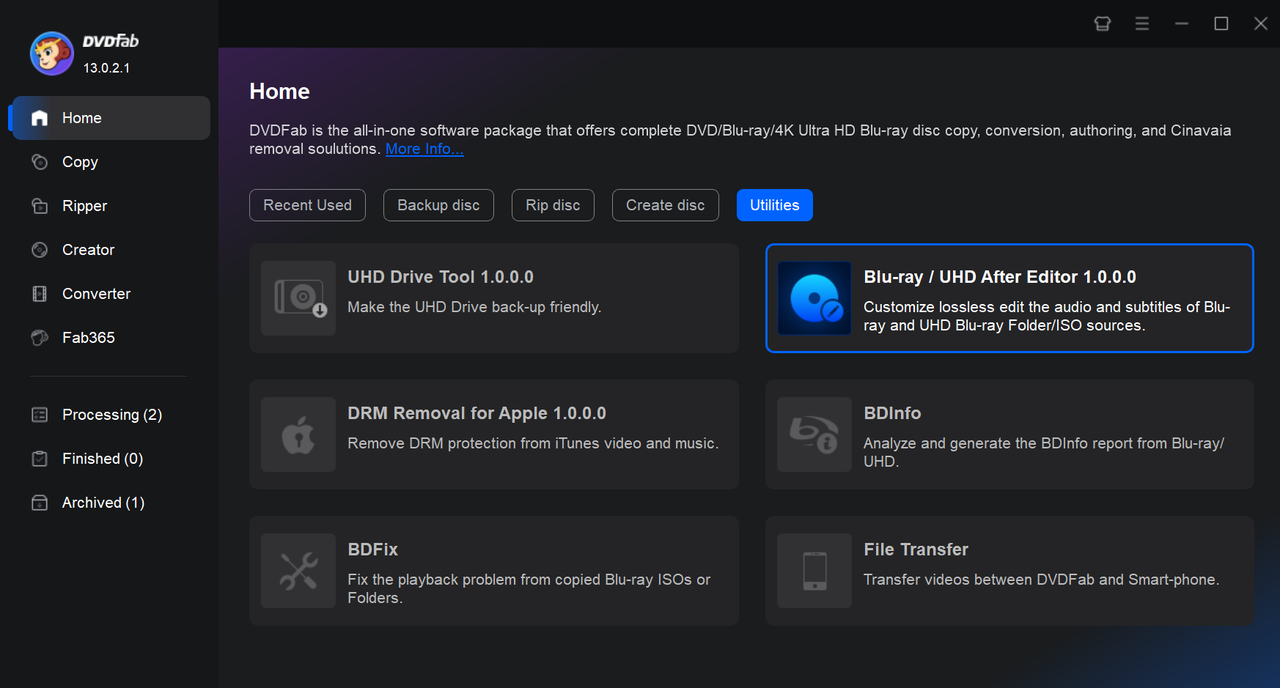
Step 1: Open DVDFab by downloading it from the official website. Blu-ray/UHD After Editor is included in the Utilities area of the home page. After you click it, you can drag the source into the interface or load the Blu-ray file using the "+" button.
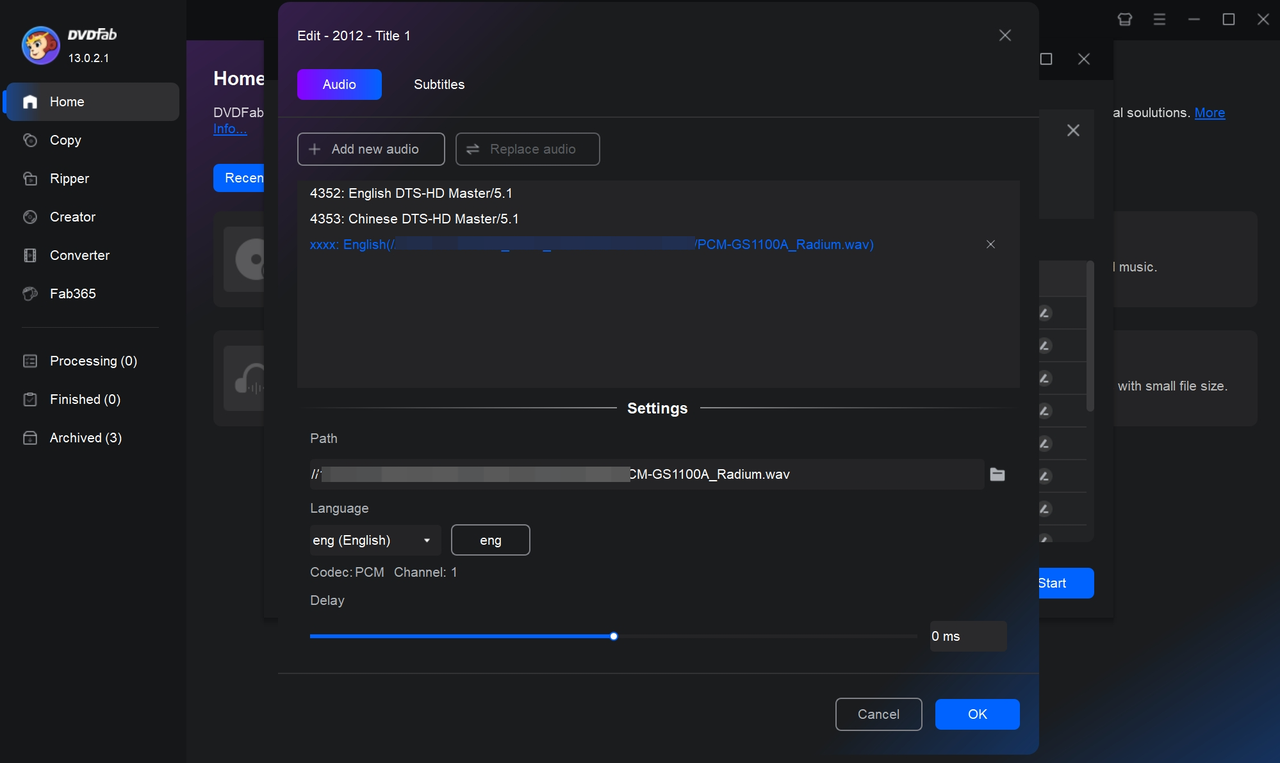
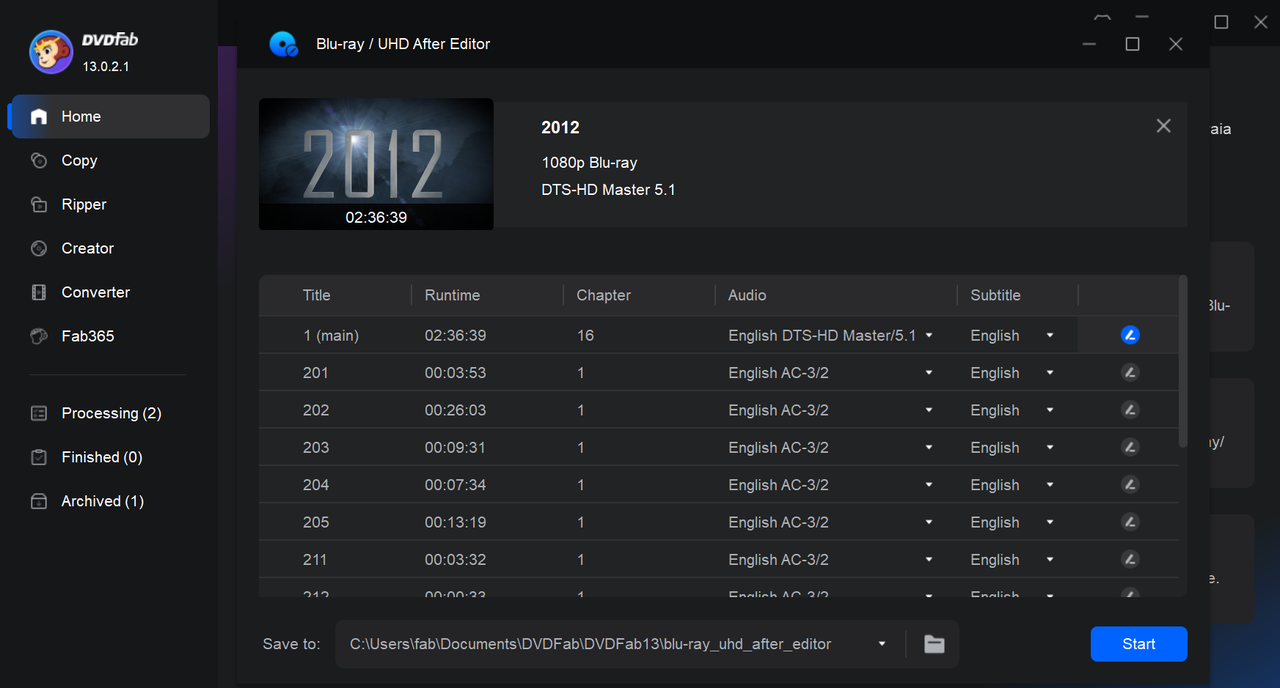
Step 2: The Blu-ray titles will all appear on the main interface after the source has loaded. Click the "Edit" icon located behind it. To add or replace audio or subtitle tracks externally, select the "Audio" or "Subtitles" tab. You can adjust the language and delay time of the just inserted audio/subtitle in the "Settings" section.
Step 3: Press "Start" to begin the Blu-ray do-it-yourself project. The procedure can be stopped at any moment.
About DVDFab
DVDFab is a well-known developer of multimedia software solutions, providing a wide array of products for ripping, creating and editing DVD, Blu-ray, and UHD. Serving millions of users globally, DVDFab has made a reputation for itself in the market by being dedicated to quality, innovation, and client happiness. Please visit the company's official website for additional information: www.dvdfab.cn
Visit us on social media:
YouTube
Media Contact
DVDFab 13 marketing@dvdfab.cn http://www.dvdfab.cn