Guangzhou, Guangdong Mar 16, 2022 (Issuewire.com) - Myki, the offline password manager and 2FA authenticator, announced that it had been acquired and all their apps and browser extensions will stop working on April 10, 2022.
As a Myki user, you are looking for the best alternative, right?
So, what do you expect from the alternatives?
- Store your data offline?
- Use the app to approve the login on the desktop?
- Safely store and autofill your 2FA?
- Offer excellent support for Myki data import?
If so, ID Guard Offline is the one you’re looking for. It almost meets all your needs.
No Internet, Storage Data Offline
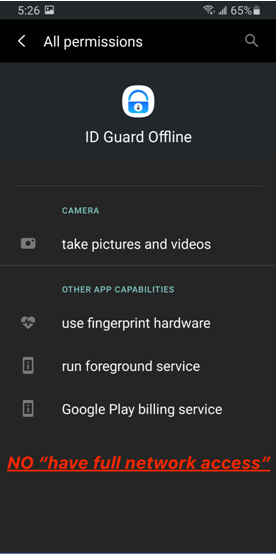
Like Myki, ID Guard Offline only stores all your data locally on your mobile phone. Since ID Guard Offline does not have access to the network, it can’t secretly send your data to the cloud.
Unlike Myki, ID Guard Offline does not ask you to sign up with a phone number or email address. As the team claims on their website: No Internet, No sign-up, No personal information. It means you can use this password manager completely anonymously and do not need to provide any private information.
The first time you open the app, it will ask you to use biometric authentication or set a master password as the protection method to protect your data. After finishing that step, you can go into the app’s main interface and start using it. It's straightforward to use without extra setup or redundant introductions.
The ID Guard Offline team also posted two blogs to tell users how to verify Offline. For Android, you can check the app permission on Google Play or phone settings; for iOS, you can check app activity in the latest iOS 15 system.
Desktop Browsers Autofilling
ID Guard Offline offers an extension for Chrome, Firefox, and Edge. However, unlike other password managers, its extension does not ask you to enter a master password to log in. It’s just an autofill framework without storing any passwords. That means you can't view your accounts and passwords on the extension.
When you launch a login page on a desktop browser, the extension will pop up a QR code for you to scan. Then you need to use the ID Guard Offline app on your phone to scan the code and choose the account you want to fill in. Finally, you will see that the username and password have been filled in the login form.
Every time you use autofill in a desktop browser, you need to open the app to scan the code and confirm. This design is a little bit like Myki's Approve Login on the app. But ID Guard Offline seems to stand out a bit more because its autofill feature also has phishing detection capabilities.
Save and Fill 2FA (OTP)
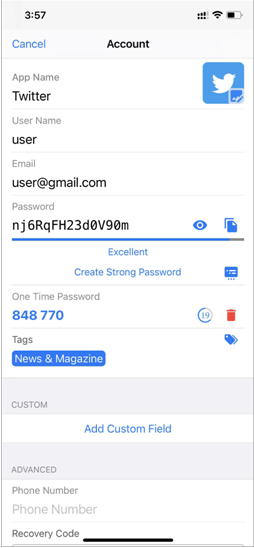
Like Myki, ID Guard Offline integrates an OTP authenticator to facilitate 2FA. Unlike Myki, ID Guard Offline does not provide a category to show OTPs but just saves them in a record along with passwords.
ID Guard Offline offers lots of custom account templates for various kinds of platforms, such as Finance, Games, and even Bitcoins. Some templates, like Github, Twitter, have OTP items. If the template does not have an OTP item, you can add it in the custom field by yourself.
When you use autofill on your mobile phone, ID Guard Offline will automatically copy the OTP for you, and then you can paste it directly after filling in the username and password. When you use autoFill on your desktop browser, ID Guard Offline will encrypt and send your OTP to the extension, and then you can click the "fill one-time password" button displayed on your desktop browser to fill in.
Support Importing Myki Data
Ease of data migration is a key point when you're considering changing to another password manager. Each password manager has a different design and allows users to save different items. ID Guard Offline seems to have done good import support for Myki after they announced to shut down in April.
After updating ID Guard Offline app to the latest version 2022.03, you can see "Import MYKI accounts" in the "Me" interface of the app. Tap it and choose files to import.
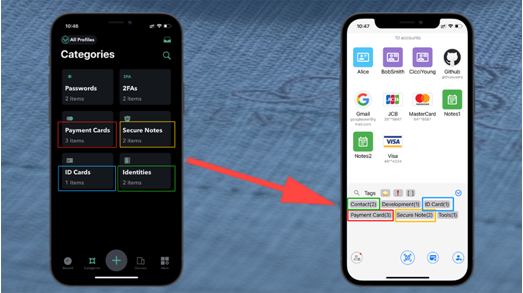
ID Guard Offline supports importing almost all kinds of Myki data, including 6 categories: Passwords, 2FAs, Payment Cards, Secure Notes, ID Cards, Identities.
However, as the ID Guard Offline team claims on their website, some data like pictures has been lost when exporting from Myki, and thus it is impossible to import them into ID Guard Offline.
If you want to know more about the export issues of Myki, click here.
Some Security Advantages
There is no denying that security is one of the most crucial factors when picking a password manager. ID Guard Offline performs well in security design, from encryption architecture to the use experience.
- True Offline
Your passwords are encrypted and stored locally and will never be uploaded to the server in any form. It's not connected to the internet, so there won't be any cyber theft.
- Security Chip Encryption
ID Guard Offline generates a secure encryption key with the help of the security chip on your devices and uses it to help encrypt your data. Even if hackers steal your data(clone data attack) by exploiting vulnerabilities or "bad" cables, or even get your master password, they still can't decrypt and view it.
- Master Password
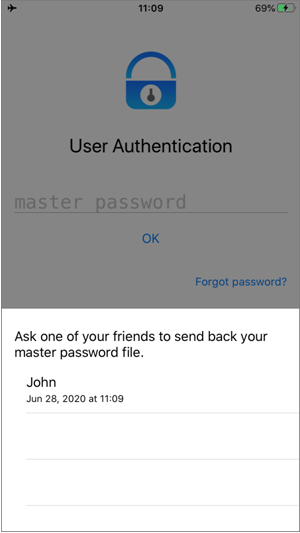
You can choose to set a master password as another layer of protection or not. ID Guard Offline does not store your master but just derives a random key from it to encrypt your data again. And also, the team has solved the issue of forgetting or losing the master password. They allow you to find back master password with the help of your friends.
- Sandbox Protection
ID Guard Offline securely keeps the encrypted data in the internal storage, a sandbox protected by the system. So other apps can't access the data inside it. Even if you install bad apps by incidents, hackers still cannot read your data.
- Phishing Detection
To prevent your passwords from being stolen, ID Guard Offline will help you identify malicious frauds when using autofill. For examples,
- Detect whether you're using the insecure HTTP connection to submit passwords;
- Show the autofill information to let you know if there is a hidden box to steal your passwords;
- Match the correct URLs and apps to prevent phishing fraud attacks or overlay attacks.
In addition to the above mentioned, ID Guard Offline has many other security designs, such as using end-to-end encryption with ECDH key agreement algorithm for extension, prohibiting taking a screenshot on the app, providing lots of custom accounts templates.
Conclusion
ID Guard Offline has many similar features to Myki and supports Myki data import perfectly. What's more, it's very secure and can help you protect your data and privacy well. So, if you are looking for an alternative to Myki, then it is the best choice for you.
ID Guard Offline offers a free version. You can go to the App Store or Google Play to download and try it.
Media Contact
The ID Guard Offline Team contact@bluespace.tech https://www.bluespace.tech/




